The Question That Actually Matters
No-code platforms are excellent at what they were designed for: getting an idea in front of real users quickly, without a development team. Many businesses should stay on them permanently. The question that matters is narrower: has your situation crossed one of four specific lines?
- The bill now scales with success, not usage. You pay more because more people touched the system, not because it did more work.
- You have hit a published hard limit that no amount of money removes.
- A feature your business genuinely needs cannot be built on the platform, at any price.
- The data is trapped, and your ability to leave gets harder every month.
If none of these apply, migrating is an expensive way to feel in control. If two or more apply, the arithmetic has usually already turned against you and you just have not run it yet.
How the Pricing Scales
All figures below come from each vendor's own pricing pages, checked on 18 September 2026. They change often, so verify them for your own plan before deciding anything.
| Platform | Entry tier | The tier most growing teams land on | What triggers the jump |
|---|---|---|---|
| [Bubble](https://bubble.io/pricing) | Free: 50K workload units per month, 1 app editor | Growth: $209 per month billed annually, 250K WU, 2 app editors | Workload units and editor seats are capped together, so growth forces a whole-tier jump |
| [Airtable](https://www.airtable.com/pricing) | Team: $20 per user per month billed annually | Business: $45 per user per month billed annually | Per-seat pricing; every colleague who needs access adds to the monthly bill |
| [Zapier](https://zapier.com/pricing) | Free: 100 tasks per month, 1 seat, 15-minute polling | Team: $69.00 per month billed annually at 2,000 tasks, 25 users | Adding teammates: Professional at $19.99 billed annually covers one seat |
| [Make](https://www.make.com/en/pricing) | Free: 1,000 credits, 2 active scenarios, 15-minute interval | Core $9, Pro $16, Teams $29, each priced for 10,000 credits per month | Every module action counts as one credit; overage protection is Enterprise-only |
| [Retool](https://retool.com/pricing) | Free: up to 5 users, 500 workflow runs per month | Business: $50 per builder per month billed annually, plus $15 per internal user | Team to Business is a 5x jump per builder, usually triggered by governance needs |
| [Webflow](https://webflow.com/pricing) | Starter: free, 50 CMS items, 20 Collections | Premium: $25 per month billed yearly, 20,000 CMS items | Platform Team starts at $2,500 per month and requires an annual contract |
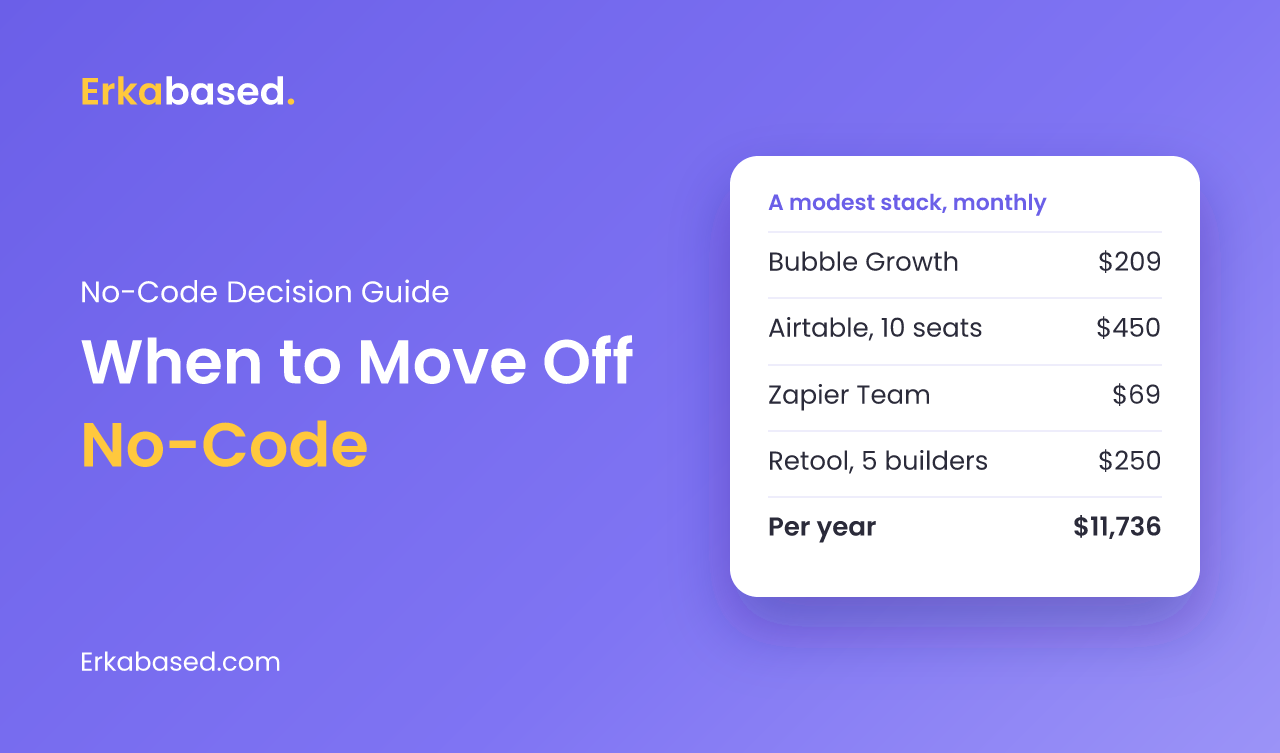
Individually, none of these is unreasonable. Stacked, they add up quietly. A team running Bubble Growth at $209, Airtable Business for ten people at $450, Zapier Team at $69, and Retool Business with five builders at $250 is paying $978 per month, or $11,736 per year, before a single line of custom code exists. That is the number to hold next to a build quote, not the $59 you remember from year one.
Limits Money Cannot Remove
Pricing is negotiable in a way that architecture is not. These are the ceilings published by the vendors themselves:
- Airtable's API rate limit is 5 requests per second per base, with a 429 response and a 30-second wait after that, per Airtable's developer documentation. It does not scale with your plan tier. If your customer-facing app reads from Airtable, this is a hard performance ceiling, not a billing question.
- Airtable records per base are capped at 1,000 on Free, 50,000 on Team, and 125,000 on Business, according to Airtable's plan documentation. 125,000 records is the published self-serve ceiling.
- Bubble bills workload units, which Bubble's manual defines as "the server resources needed to host, run, and scale apps built on Bubble" across 12 tracked activity types. Inefficient logic costs money directly, so optimization work becomes a recurring expense rather than a one-time fix.
- Zapier bills tasks, defined in Zapier's help documentation as "any successful action that runs in Zapier". Triggers, filters, paths and failed steps do not bill, but error-handler steps, replays and sub-Zap actions do. Your bill therefore rises fastest exactly when things go wrong.
- Webflow applies surge protection: two consecutive months over the limit triggers an automatic plan upgrade.
Run the Arithmetic Honestly
Compare the right things. The fair comparison is not "subscription versus build price"; it is three years of subscription plus the work you cannot do, against build price plus hosting and maintenance.
- Add up every no-code subscription you pay today, including the automation tools and the ones a single department expensed.
- Project it at the headcount and volume you expect in 24 months, using the per-seat and per-usage rules above rather than today's line item.
- Add the cost of the workarounds: manual exports, reconciliation, the person who "just fixes the sheet on Mondays".
- Add the risk you are carrying: a rate limit that caps your customer experience, or a record ceiling you will reach mid-year.
- Only then put a build quote next to it, and remember the build has running costs too.
This is the same discipline we apply when scoping any system, and it is why we start with workflows rather than features, the approach described in our walkthrough of the software development life cycle.
What Migration Actually Involves
Public, first-hand postmortems of no-code migrations are surprisingly rare; nearly everything published on the topic is marketing from companies selling one side of the answer, so treat confident timelines with suspicion. What is consistent across the projects we have run:
- The data model is the real work. Spreadsheets and bases accumulate columns that mean different things in different rows. Reconciling that is a milestone, not a task.
- Integrations must be rebuilt, not copied. Every automation you assembled in a visual builder becomes an explicit contract between systems. That is a good thing, and the reason it helps to understand what an API is.
- Users need a reason to move. A custom system that merely matches the old one will be resented. Pick two workflows that are visibly painful today and make them obviously better.
- You do not have to migrate everything. Keeping a marketing site on Webflow while moving operations to a custom system is a perfectly sensible end state.
When to Move Off No-Code
Move if you can tick three or more. Stay if you cannot.
- Your subscriptions cost more per year than a focused first version would cost to build.
- You have hit a published hard limit, or you will within a year at current growth.
- You are paying per seat for people who only need to read data.
- A revenue-relevant feature is impossible on the platform, not merely awkward.
- Your customer-facing experience depends on a rate limit you do not control.
- You are maintaining a spreadsheet that exists only to fix what the platform cannot, a signal we also discuss in optimizing operations with inventory and purchasing systems.
- Compliance, audit trails, or data residency requirements have entered the conversation.
Conclusion
No-code earns its place by removing the cost of starting. It charges that cost back later, through per-seat pricing, usage billing, and limits you cannot engineer around. Leaving is not a verdict on the tools; it is a normal stage in a growing business, and it goes badly only when it is decided emotionally instead of arithmetically. Price the next two years before you price the rebuild, and pick the technology stack afterwards, not first.
Sources
- Pricing — Bubble, checked 18 September 2026
- Workload — Bubble Manual, checked 18 September 2026
- Pricing — Airtable, checked 18 September 2026
- Airtable plans — Airtable Support, checked 18 September 2026
- API rate limits — Airtable, checked 18 September 2026
- Pricing — Zapier, checked 18 September 2026
- Zapier plans and pricing — Zapier Help, checked 18 September 2026
- Pricing — Make, checked 18 September 2026
- Pricing — Retool, checked 18 September 2026
- Plans & pricing — Webflow, checked 18 September 2026
Frequently Asked Questions
When should a business move from no-code to custom software?
When at least one hard condition is met: the bill scales with headcount rather than usage, you have hit a published platform limit, a revenue-relevant feature is impossible to build, or your data is effectively trapped. If none of these apply, migrating usually costs more than it returns.
How much does a no-code stack actually cost per year?
More than the entry price suggests once several tools stack up. Using published prices checked on 18 September 2026, Bubble Growth at $209 per month, Airtable Business for ten seats at $450, Zapier Team at $69 and Retool Business with five builders at $250 comes to $978 per month, or $11,736 per year.
What are the hard limits of Airtable and Bubble?
Airtable publishes an API rate limit of 5 requests per second per base that does not scale with plan tier, and a ceiling of 125,000 records per base on its Business plan. Bubble bills workload units representing server resources across 12 tracked activity types, so inefficient logic becomes a recurring cost rather than a one-time fix.
Do I have to migrate my whole no-code stack at once?
No, and usually you should not. A common end state keeps a marketing site on a website builder while moving operational workflows to a custom system. Migrate the parts that are hitting limits or costing per seat, and leave the parts that are working alone.
Is custom software cheaper than no-code in the long run?
Sometimes, but it is not automatic. Custom software replaces a subscription with a build cost plus hosting and maintenance, so the comparison only favours it once subscriptions, per-seat fees and manual workarounds have grown large enough. Project your no-code bill at 24-month headcount and volume before comparing.
What is the biggest risk when migrating off no-code?
The data model. Bases and spreadsheets accumulate columns whose meaning drifts between rows, and reconciling that is a project milestone in its own right rather than a quick export. Teams that treat migration as a copy job are the ones whose timelines slip.
At Erkabased, we often start by reading the no-code system a client already runs, because it is the clearest specification of how the business actually works. From there we build only what the platform cannot do — typically a web app in 4-12 weeks, and leave the rest where it is. Contact us if you want a second opinion before you commit to a rebuild, or see our software house page.